Wordfence officially confirmed that the Ninja Forms File Upload plugin (CVE-2026-0740) had a critical 9.8 CVSS vulnerability that allowed a hacker to upload a PHP file without logging in and take down an entire server. This article includes the actual code, attack flow diagram from wordfence and a complete technical breakdown by us and anyone can understand.
Introduction : Small Flaw Exposes 50,000+ WordPress Sites to RCE Risk
In the world of cybersecurity, a small coding mistake by a developer could destroy 50,000 websites worldwide. This is what happened with the Ninja Forms File Upload WordPress plugin. Wordfence the world’s largest WordPress security company trusted by over 5 million websites, officially confirmed.
On April 6, 2026 that versions of this plugin up to 3.3.26 contained a dangerous vulnerability that allowed an uninformed user to upload and execute malicious code directly on the server without a username or password. The official name of this vulnerability is CVE-2026-0740 and its CVSS score is 9.8 out of 10 which is the maximum critical level.
Ninja Forms File Upload Plugin
Plugins in WordPress are applications that add extra features to your website. Ninja Forms is a very popular form-builder plugin. You can create contact forms, registration forms, surveys, everything with it. The File Upload extension of Ninja Forms adds file uploading facility to it website visitors can submit their documents, images or other files directly to the website. The vulnerability was hidden in this file upload feature, which technically proved to be a game-changer for hackers.
How the Vulnerability Was Discovered : A Responsible Disclosure Story
On January 8, 2026 an independent security researcher Sélim Lanouar whose online handle is whattheslime responsibly reported this vulnerability through the Wordfence Bug Bounty Program. Responsible disclosure means that the researcher first reported this information to Wordfence, rather than passing it directly to hackers, so that there is no exploitation before the fix is implemented.
Wordfence awarded Lanouar a bounty of $2,145 in recognition of this valuable work. On the same day January 8, 2026 Wordfence deployed the firewall rule for its premium users and also sent full disclosure details to the plugins developers (the Saturday Drive team). This was an ideal responsible disclosure process.
Technical Breakdown
Now the most important part of this article is looking at the actual code that caused this vulnerability. Wordfence has publicly shared this code in its official blog post so that developers and the security community can understand what exactly was wrong.
The first function handle_upload( )
Whenever a visitor uploads a file to the website via Ninja Forms and this plugin function runs:
public function handle_upload() {
$field_id = $this->get_field_id();

if ( ! $field_id ) {
    $this->_errors[] = __( 'No field ID supplied', 'ninja-forms-uploads' );
    $this->_respond();
}

$result = check_ajax_referer( 'nf-file-upload-' . $field_id, 'nonce', false );
if ( false === $result ) {
    $this->_errors[] = __( 'Nonce error', 'ninja-forms-uploads' );
    $this->_respond();
}

$form_id = $this->get_form_id();

if ( ! $form_id ) {
    $this->_errors[] = __( 'No form ID supplied', 'ninja-forms-uploads' );
    $this->_respond();
}

$field_instance_id = filter_input( INPUT_POST, 'field_id' );

$files_key = 'files-' . str_replace( '.', '_', $field_instance_id );
if ( ! isset( $_FILES[ $files_key ] ) ) {
    $this->_errors[] = $this->code_to_message( '' );
    $this->_respond();
}

 $this->_data['files'] = $this->_prepare( $_FILES[ $files_key ] );

    $this->_process();
    $this->_respond();
}
This function looks fine the nonce is checked and the field ID is checked. But the real problem was in the _process() function that follows.
Second Function _process( ) Where the Real Flaw Was
protected function _process() {
foreach ( $this->_data['files'] as $key => $file ) {

$file_name = $this->get_filename_from_chunk();
    if ( $file_name ) {
        $file['name'] = $file_name;
    }

    $file_size = $this->get_file_size_from_chunk();
    if ( $file_size ) {
        $file['size'] = $file_size;
    }

    if ( false === $this->_validate( $file ) ) {
        unset( $this->_data['files'][ $key ] );
        @unlink( $file['tmp_name'] );
        continue;
    }

    $file_key     = strtolower( str_replace( array( ' ', '.' ), '_', $file['name'] ) );
    $new_tmp_name = filter_input( INPUT_POST, $file_key );

 There was no check of the destination filename here
Attacker could have injected a .php extension here

    if ( empty( $new_tmp_name ) ) {
        $new_tmp_name = $this->get_temp_filename( $file['name'] );
    }

    $new_tmp_file_path = NF_File_Uploads()->controllers->uploads->get_path( $new_tmp_name, true );

    $append_file = $this->get_content_range() && is_file( $new_tmp_file_path ) && $file['size'] > NF_FU_Helper::get_file_size( $new_tmp_file_path );

    if ( $append_file ) {
        $result = file_put_contents( $new_tmp_file_path, fopen( $file['tmp_name'], 'r' ), FILE_APPEND );
    } else {
        $result = move_uploaded_file( $file['tmp_name'], $new_tmp_file_path );
    }

    if ( false === $result ) {
        unset( $this->_data['files'][ $key ] );
        $this->_errors[] = __( 'Unable to move uploaded temp file', 'ninja-forms-uploads' );
        continue;
    }

    wp_schedule_single_event( apply_filters( 'ninja_forms_uploads_temp_file_delete_time', time() + HOUR_IN_SECONDS ), 'nf_fu_delete_temporary_file', array( $new_tmp_file_path ) );

        $this->_data['files'][ $key ]['tmp_name'] = $new_tmp_name;
        $this->_data['files'][ $key ]['new_tmp_key'] = $file_key;
    }
}
What Exactly Was Wrong in the Code Explained in Simple Terms
One thing is clearly visible while reading this code. It has _validate($file) function which checks the source filename i.e. the file uploaded by the visitor. But when $new_tmp_name i.e. the destination filename where the file will actually be saved on the server is taken from the POST request, no extension check is applied on it.
Meaning if the attacker puts the value of $new_tmp_name as shell.php in the POST request and the plugin does not stop it at all. Then the move_uploaded_file( ) function moves that file to the server. Additionally, there was no filename sanitization, making path traversal possible and meaning an attacker could place a file outside the restricted upload folder and directly into the website root by entering a value like ../../../webroot/shell.php.
Attack Flow : Step-by-Step How Hackers Exploited It
Wordfence also shared an Attack Flow diagram in its official post that shows exactly how the exploitation took place and where the Wordfence Firewall stopped the attack.
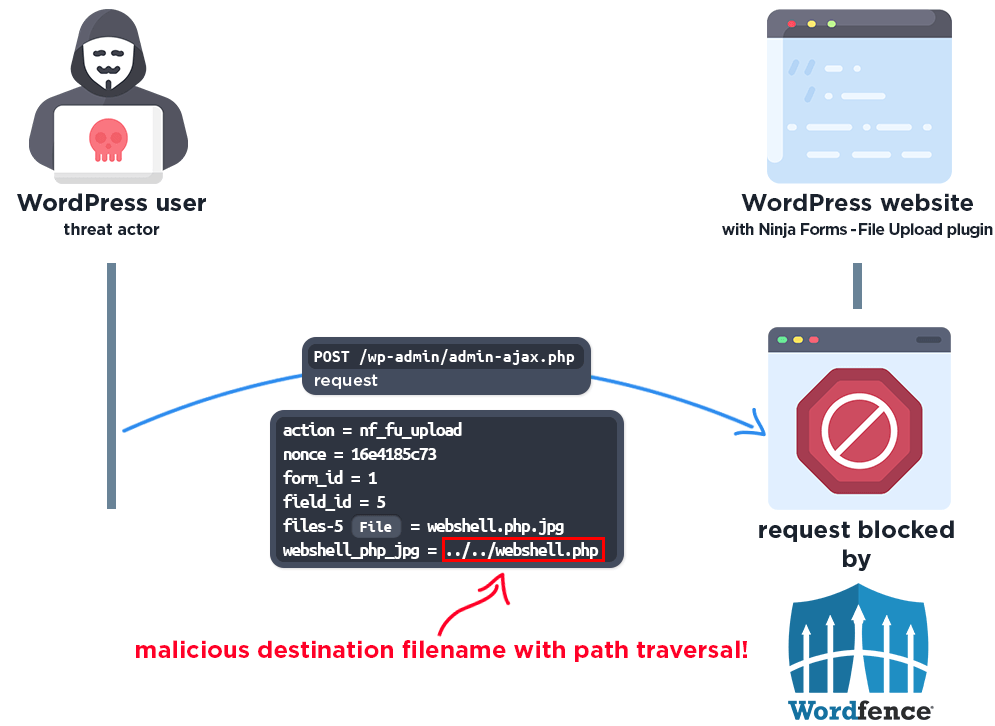
This diagram shows that the attacker first obtained a valid nonce (security token) easily obtained from public form pages. Then they uploaded a malicious PHP file such as shell.php via a POST request but injected a .php extension into the destination filename parameter.
The plugin checked the source file and passed it, but there was no check on the destination. move_uploaded_file() saved the malicious PHP file to the server. The attacker then simply opened the URL of the file in the browser and the PHP code was executed and giving the attacker complete server control. For users with a Wordfence Firewall, this attack was blocked at the very first step due to the firewall rule.
Wordfence Timeline : Discovery & Patch Details
Wordfences official disclosure timeline isThe vulnerability was reported on January 8, 2026 and the firewall rule was deployed the same day which meaning Wordfence Premium, Wordfence Care and Wordfence Response users received the same protection. On the same day, Saturday Drive (plugin developers) shared the full technical details via the Wordfence Vulnerability Management Portal.
Free Wordfence users received the same protection 30 days later on February 7, 2026. A partial patch version 3.3.25 of the plugin was released on February 10, 2026. However this patch did not fully work.The final and complete fix version 3.3.27 was released on March 19, 2026. On April 6, 2026 Wordfence made a public disclosure and revealing the full story of this vulnerability. On April 7, 2026 the news went viral across the worldwide cybersecurity media.
Security Patch Explained : What Was Fixed in the Update?
In version 3.3.27 the developers added everything that was previously missing. Now the destination filename i.e. $new_tmp_name also receives strict checks. Wordfences official disclosure provides a comparison of the patched code,which shows that path traversal is now blocked with the basename() function filenames are cleaned with sanitize_file_name() and extension blacklist checks are also applied to the destination filename. These three changes together ensure that no .php or other executable files can be saved to the destination.
The following section was specifically added to the Patched Code:
 Security fix: Sanitize user-provided filename to prevent path traversal
if ( ! empty( $new_tmp_name ) ) {

    Remove any path traversal attempts - use only the basename
    $new_tmp_name = basename( $new_tmp_name );
     Apply WordPress filename sanitization
    $new_tmp_name = sanitize_file_name( $new_tmp_name );

     Validate destination extension against blacklist
    $dest_extension = strtolower( pathinfo( $new_tmp_name, PATHINFO_EXTENSION ) );
    if ( self::blacklisted( self::get_extension_blacklist(), $dest_extension ) ) {
        $this->_errors[] = sprintf(
            __( 'File extension of %s not allowed', 'ninja-forms-uploads' ),
            $dest_extension

        );
        unset( $this->_data['files'][ $key ] );
        @unlink( $file['tmp_name'] );
        continue;
    }
}
This was a simple but crucial fix. Adding just three checks eliminated a flaw that could have put 50,000 websites at risk for months.
How Wordfence Users Stayed Protected
Users using Wordfence Premium, Care, or Response plans received the virtual firewall patch on January 8, 2026, the same day the vulnerability was reported. Meaning they didn’t need to do anything and the Wordfence firewall started blocking the attack right away.
This is a testament to Wordfences defense-in-depth approach and protection is provided without waiting for the plugin to be fixed. Free Wordfence users were also protected within 30 days, until February 7. However the users who weren’t using any security plugins were potentially exposed until March 19 when the final patch came out.
Full Impact : What a Hacker Could Have Done
After getting Remote Code Execution (RCE), the hacker could do practically anything. He could install a webshell and a backdoor which he could use even after the plugin was patched. He could break into the database and steal emails, passwords, credit card information and private data of all the users.
He could spread malware on the entire website which would also infect the computers of the visitors.He could inject spam links to destroy the SEO of the website. He could deploy ransomware on the poor hosting environment i.e encrypt all the data and demand ransom. And the most dangerous thing is that it could also attack any other website hosted on the same server.
Website Protection & Key WordPress Security Lessons
If you use the Ninja Forms File Upload plugin, go to your WordPress dashboard and check the plugin version in the Plugins section. Version 3.3.26 or older is unsafe and update to 3.3.27. Its also important to install a security plugin like Wordfence which detects and blocks threats in real time and provides virtual firewall protection against future vulnerabilities even if the plugin isn’t updated.
Take regular backups of your website. Always keep your WordPress core, themes, and all plugins at the latest version. And if you use any plugin which you do not use then deactivate and delete it, this reduces the attack surface.
This case is a big lesson that validating at one place in the coding is not enough, there should be strict checks at every place, every input and every parameter. The developer applied check on the source filename but forgot the destination filename this small mistake became the cause of huge problem.
Along with this the process of responsible disclosure by the researcher reporting directly to Wordfence and giving the fix before public disclosure was proved to be the best way in this case also. 50,000 websites were saved from being potentially exploited just because of this.
Final Thoughts
The Ninja Forms File Upload vulnerability (CVE-2026-0740) is a reminder that nothing is 100% secure in digital security but responsible security research, bug bounty programs and quick patching can together keep the world quite safe. If you run a WordPress website, learn from this case apply updates, keep security plugins and keep an eye on the news. Thank goodness Wordfence publicized this case in such detail so the entire community could learn.