Kali Linux 2026.2 ships GNOME 50 KDE Plasma 6.6 a brand new APT sources format faster VM boot times and 9 fresh penetration testing tools including legba and tookie osint for ethical hackers and security researchers.
Kali Linux 2026.2 New Features Technical Explanation
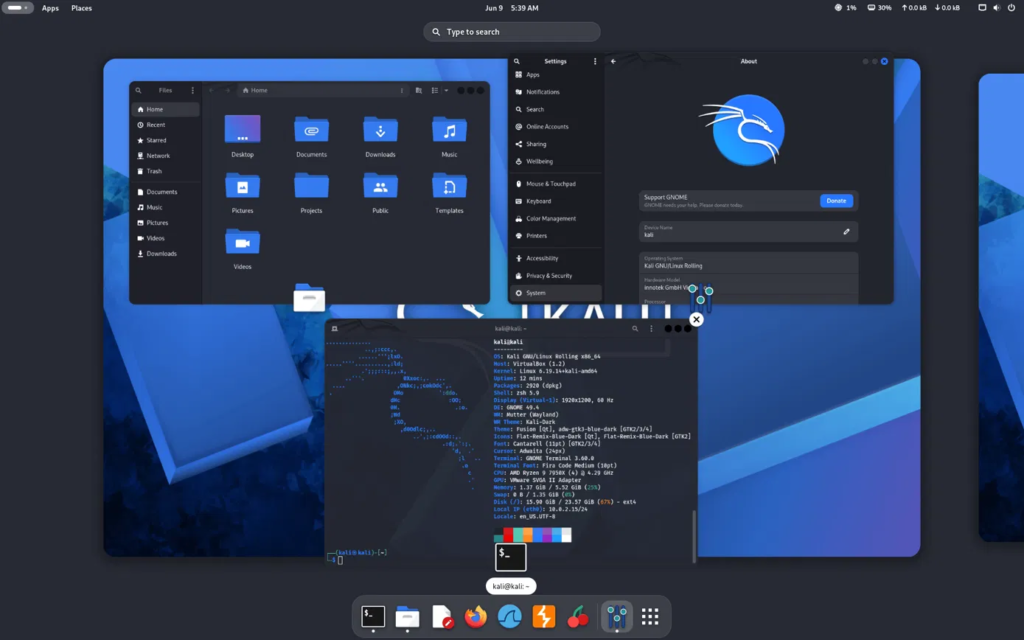
The desktop side of this release centers around two major upgrades that arrive together every other Kali cycle. GNOME jumps to version 50 bringing a noticeably faster file manager with quicker thumbnail loading and lower memory usage along with a redesigned accessibility preferences window and automatic language switching. Document Viewer also picks up native annotation support letting users highlight and add text notes directly inside PDF files without needing a separate tool open at the same time.
(source: kali.org)
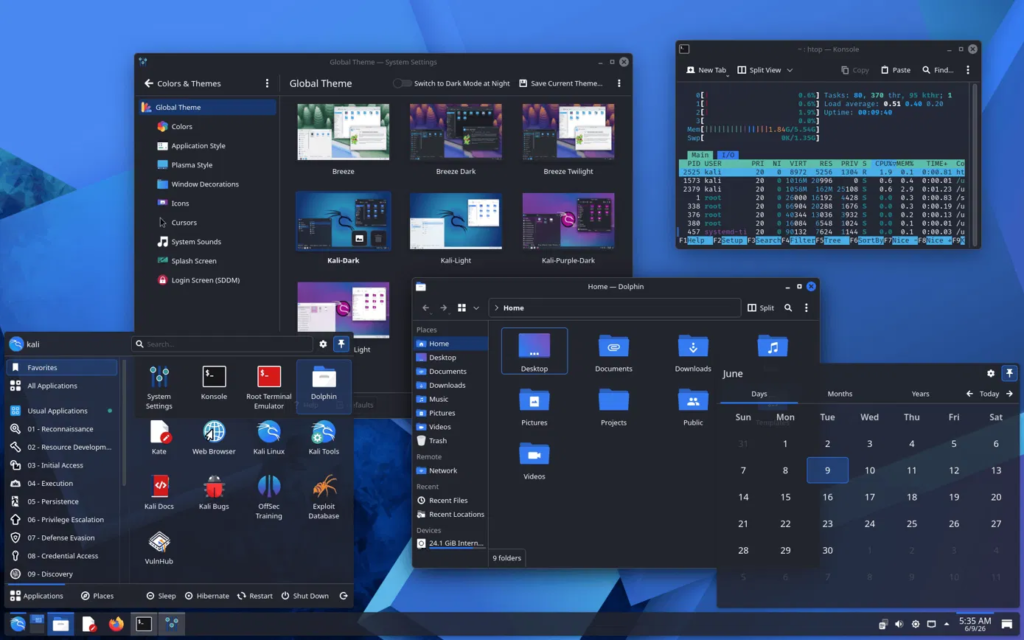
KDE Plasma users get version 6.6 which introduces a genuinely useful addition for anyone running Kali on a tablet or touch enabled device through a brand new on screen keyboard. The Spectacle screenshot tool now performs built in text recognition letting users extract readable text straight out of a screenshot instantly which saves real time during reporting work when documenting findings from a target system
(source: kali.org)
Accessibility also receives meaningful attention here through new color vision support Zoom and Magnifier improvements and Slow Keys support finally landing on Wayland sessions.
One of the most overlooked but genuinely impactful changes in this release involves how Kali handles its package sources. The long standing sources list file gets replaced going forward by a newer deb822 style format stored inside a dedicated sources directory. Both formats still work side by side for now and existing installations stay untouched but every fresh install moving forward adopts this cleaner structure that matches where Debian and its derivatives are heading industry wide.
VM users specifically get one of the most practical improvements buried inside this release. Kali traditionally pre installed a wide range of graphics firmware covering Nvidia AMD and Intel hardware which historically pushed the boot time loading image past 200 megabytes. Since most virtual machine setups never actually need that firmware unless GPU passthrough is involved the team stripped it out entirely for VM specific images and installer detection now automatically skips firmware installation when it detects a virtualized environment. The resulting boot image shrinks down to roughly 60 megabytes which translates into boot times running close to three times faster on tested QEMU setups.
A few updates in this release do require attention before rebooting blindly into your next engagement. The polkit package update needs a system reboot otherwise GUI applications launched as root will throw confusing error messages that have nothing obviously to do with the actual cause. The xrdp remote desktop server also moved to its newer 0.10 series which means anyone connecting to Kali remotely including Hyper V users relying on Enhanced Session Mode needs to reboot afterward to avoid connection issues.
Kernel choice for this release landed on version 6.19 rather than the newest 7.0 branch specifically to avoid breaking compatibility with Nvidia DKMS drivers that reportedly had issues on the newer kernel inside Debian testing. Anyone who genuinely wants the latest kernel and does not run Nvidia hardware can still pull 7.0 directly from the kali experimental repository or simply update fully from kali rolling where it already sits available.
New Penetration Testing Tools And Security Toolset Additions
Nine brand new tools landed in the official repositories this cycle and each one fills a genuinely useful gap rather than feeling like filler. The legba tool brings a fast multiprotocol credential brute forcer capable of password spraying and account enumeration across several services from a single unified interface. Hydra GTK makes a comeback as a graphical front end for the classic network logon cracker giving newer analysts a friendlier entry point into brute force testing without memorizing every command line flag upfront.
Document and email focused testers gain oletools for analyzing Microsoft OLE2 files and Office documents which routinely matters during phishing simulation engagements and malware triage work involving malicious macros. The penelope shell handler adds a more polished and powerful reverse shell management experience for red team operators juggling multiple sessions during an active engagement.
OSINT focused practitioners get real value from tookie osint a dedicated tool built specifically for finding social media accounts tied to a target identity which fits naturally alongside reconnaissance heavy engagements and people focused investigations. The uro tool tackles a quieter but very real pain point by decluttering massive URL lists during crawling and web application testing helping analysts cut through noisy duplicate paths before they even start fuzzing.
Tailscale also joins the lineup bringing secure mesh networking connectivity directly into Kali which proves genuinely handy for setting up private remote access between distributed lab machines or team members during collaborative testing. Rounding things out shell gpt brings AI powered command line productivity assistance directly into the terminal workflow while arsenal ng ships as a Go based command reference library packed with more than two hundred cybersecurity cheat sheets covering everything from enumeration syntax to exploitation one liners.
Mobile hacking gets serious attention this cycle through Kali NetHunter as well. The app now launches instantly and a brand new EvilTwin tab brings fake access point creation alongside a captive portal password verification flow which required fixing long standing iptables conflicts that previously broke Android hotspot functionality after running similar tools.
The community also hit a real milestone this release with nearly universal Wi-Fi injection support landing across a wide range of Android kernels spanning devices from the OnePlus 7 through several Xiaomi Samsung and POCO models built on both 4.x and 5.x kernel branches.
Upgrade Guide And Update Recommendations
Anyone running an existing Kali installation should pull the latest packages through a standard system update followed immediately by a full upgrade command rather than waiting for a fresh image download. Given the disruptive nature of the polkit and xrdp updates mentioned above scheduling a reboot right after that upgrade completes saves a lot of confusing troubleshooting later especially for anyone relying on remote desktop access or GUI tools launched with elevated privileges.
Security professionals running Kali specifically inside virtual machines for client engagements should pay close attention to the new VM detection behavior during fresh installs since it directly impacts boot speed and disk usage going forward. Anyone doing GPU passthrough work for password cracking labs or machine learning assisted security tooling needs to manually verify graphics firmware availability since the new default skips installing it automatically inside detected virtual environments.
Teams managing multiple Kali instances across a lab environment should treat the upcoming sources format transition as a good opportunity to standardize configuration across machines now rather than waiting until the old format eventually triggers deprecation warnings in a future release. Bookmarking the official Kali changelog and subscribing to their release announcements remains the most reliable way to catch these kinds of disruptive update notes before they cause unexpected downtime during an active engagement window.
This release ultimately reflects what a mature and actively maintained penetration testing distribution should look like heading into the second half of 2026. Small quality of life fixes faster virtual machine performance and a thoughtfully curated set of new tools matter just as much as flashy headline features and Kali 2026.2 delivers exactly that kind of steady dependable progress that working security professionals actually rely on day to day.