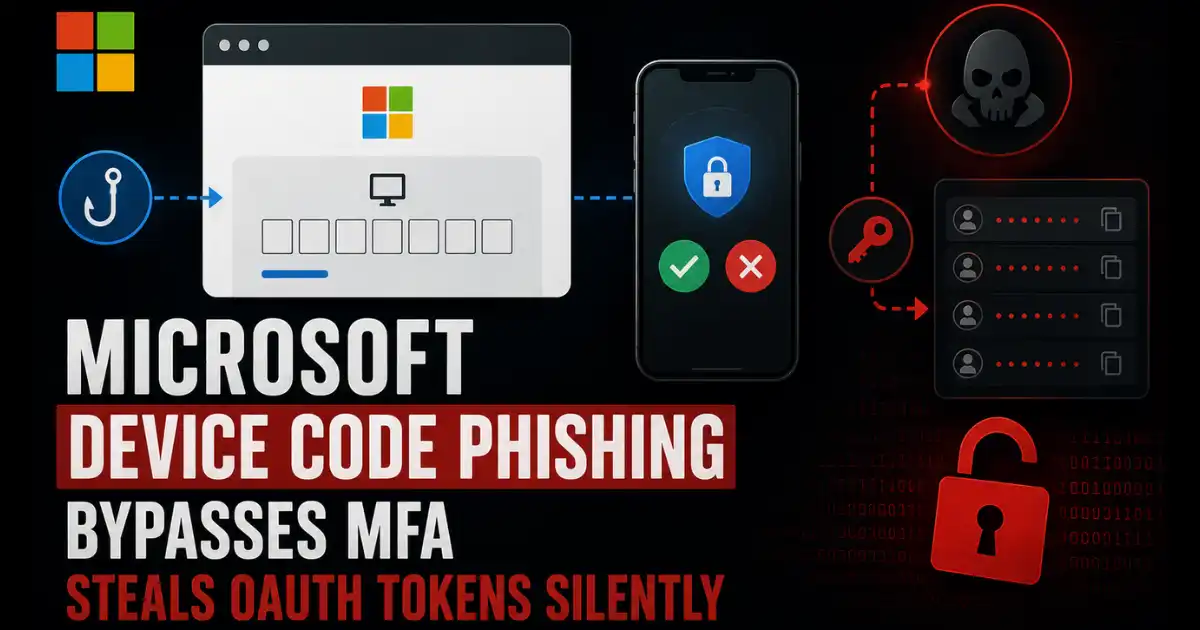
Kaspersky researchers uncovered a real world Microsoft Device Code Phishing campaign running from April to May 2026 that abused OAuth 2.0 Device Authorization Grant to steal access tokens refresh tokens and full Microsoft 365 account access without ever touching a suspicious domain.
Imagine getting an urgent email from what appears to be a law firm asking you to review important documents. You click through a PDF. The link inside points to a real Microsoft domain. You check the URL carefully and everything looks legitimate.
You enter a short code on the official Microsoft login page. You complete your own MFA. And somewhere else entirely an attacker just received your access token your refresh token and your full Microsoft 365 session. No fake domain. No suspicious URL. No malware. Just a standard authentication protocol doing exactly what it was designed to do.
Microsoft OAuth Attack Explained
Kaspersky researchers documented this exact campaign running between early April and mid May 2026 and the technique at its core exploits a legitimate Microsoft identity protocol called OAuth 2.0 Device Authorization Grant also known as Device Code Flow. This specification was originally built to solve a genuine problem. Smart TVs printers and IoT devices that lack a full keyboard or browser need a way to authenticate users against cloud services.
The solution lets a device display a short code and a URL so the user can complete authentication on a nearby smartphone or computer instead. Microsoft built their implementation around the domain microsoft.com/devicelogin which everyone in enterprise security already trusts completely.
Attackers turned this trusted flow into a credential harvesting engine by running the attacker controlled application on their own server while pushing the authentication burden entirely onto the victim. The attack starts when an attacker sends a POST request to the Microsoft devicecode endpoint requesting a fresh user code and device code pair for their own registered application.
The server returns both codes along with a verification URI and an expiry window. The attacker then packages the user code into a phishing workflow and sends it to the victim. From that point the attacker simply polls the Microsoft token endpoint repeatedly waiting for the victim to complete authentication. Once the victim enters the code on Microsoft’s actual legitimate website and confirms MFA the server recognizes the code as valid and hands the attacker a complete set of tokens including access token refresh token and id token.
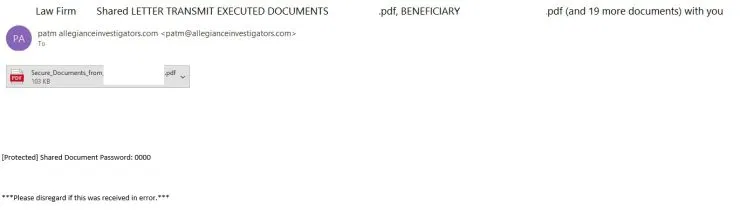
The April to May 2026 campaign wrapped this technical chain inside a layered social engineering workflow. The initial email presented itself as a notice from a law firm and carried a password protected PDF attachment to add legitimacy and bypass automated email scanning.
(source: Kaspersky Securelist)
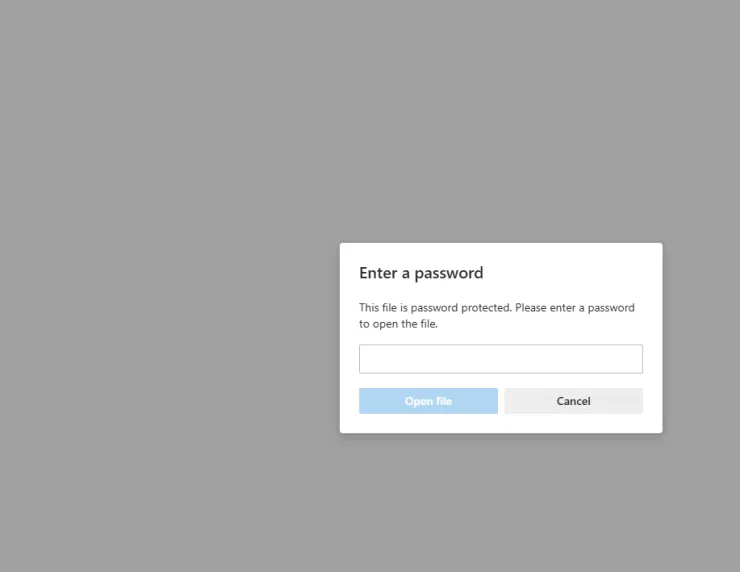
Inside the PDF a landing page appeared listing what looked like accessible documents but each document required clicking a link. That link pointed directly to a legitimate Microsoft URL however its redirect parameters pushed the user immediately to the phishing infrastructure rather than keeping them on Microsoft property. Multiple CAPTCHAs appeared on the intermediate page specifically designed to block automated security crawlers from following the chain and classifying it as malicious before real victims arrived.
(source: Kaspersky Securelist)
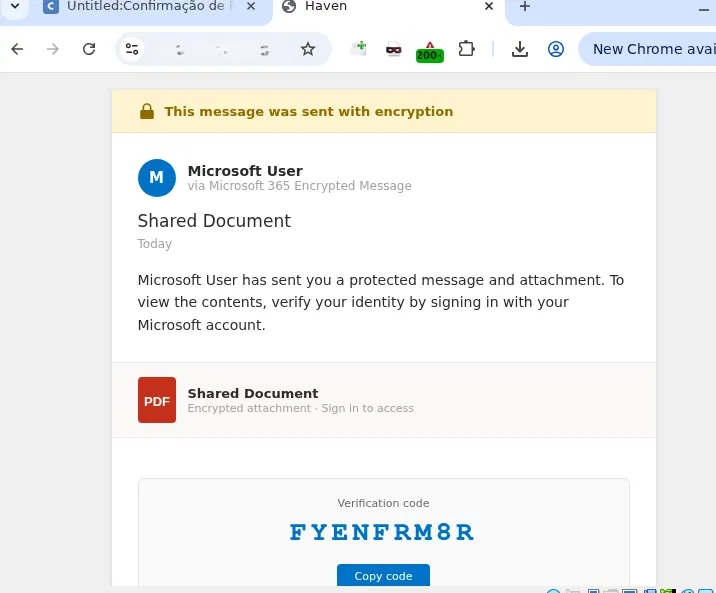
The final page displayed the actual user code the attackers server had already obtained from Microsoft and clicking it automatically copied the code to clipboard while simultaneously opening the real Microsoft devicelogin page in the same browser session.
(source: Kaspersky Securelist)
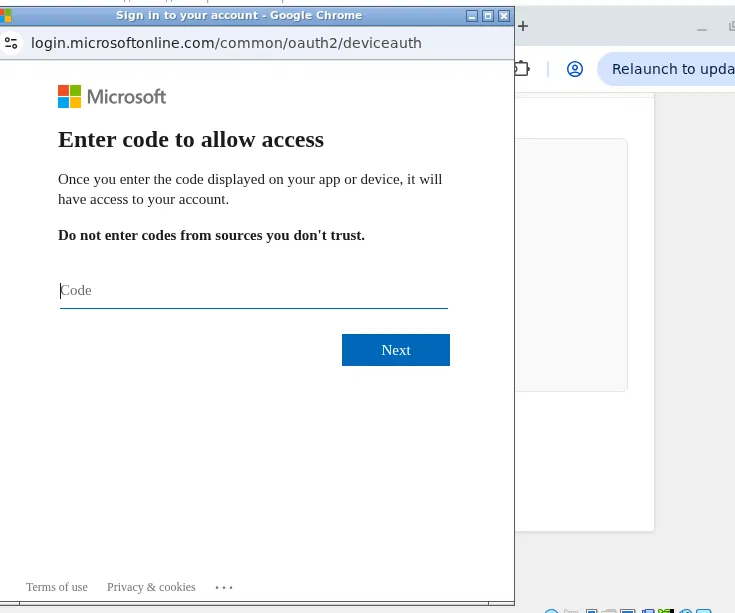
The victim saw a completely legitimate Microsoft authentication interface pasted their code and completed their own MFA challenge without any indication that completing this step handed an attacker full access to their mailbox their OneDrive files and their Teams conversations. The attacker’s polling loop detected the successful authentication and received the token set within seconds.
(source: Kaspersky Securelist)
The refresh token sitting inside that harvested set deserves particular attention because its implications extend well beyond the immediate session. Microsoft refresh tokens for enterprise accounts often carry validity periods stretching across months.
Attacker holding a valid refresh token can silently request new access tokens without the user ever being asked to authenticate again. This means that even if a victim changes their password after discovering something suspicious the attacker retains full access until the refresh token itself gets explicitly revoked through administrative action.
Device Code Phishing Geographic Targeting And Variant Analysis
This campaign showed deliberate adaptation to specific regional targets beyond its initial scope. After the April to May 2026 operation Kaspersky researchers detected a variant specifically modified for users in Brazil.
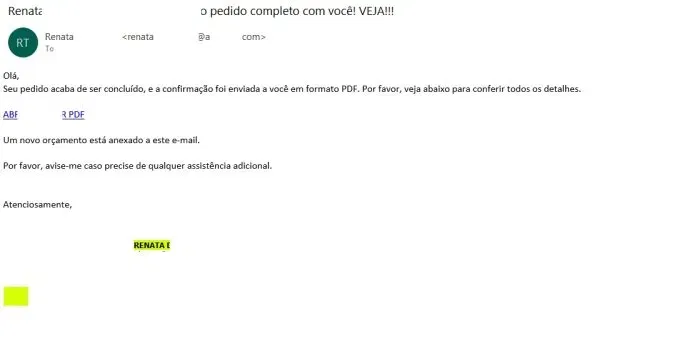
The Brazilian version dropped the password protected PDF entirely and instead embedded a link pointing to Cacoo.com a legitimate online diagramming and collaboration platform owned by Nulab. Trusted domains like Cacoo serve the same purpose in this attack chain as the Microsoft redirect URL served in the original campaign.
(source: Kaspersky Securelist)
Any recipient who hovers over the link and checks the domain name sees a completely legitimate business tool rather than any suspicious phishing infrastructure. The redirect parameters buried after the domain name handle the actual routing toward the phishing page where the user code waits. securelist
The language shift also matters from a targeting precision standpoint. The Brazilian phishing email mimicked an order confirmation notice written in Portuguese including a download button and a note instructing the recipient to use the same account that received the message to authenticate the document.
This instruction cleverly pushes the victim toward using their real corporate credentials rather than a personal account which maximizes the value of the tokens eventually stolen. The landing page structure remained nearly identical to the original campaign but the social context shifted entirely to match the expectations of a Portuguese speaking professional audience.
This regional adaptation pattern suggests the threat actor behind this campaign treats Device Code Phishing as a scalable and repeatable technique rather than a one time operation. The underlying infrastructure stays largely the same across variants while only the lure content and the trusted redirect domain get swapped out for each new target geography.
Security teams monitoring for this attack pattern should expect continued evolution of the social engineering wrapper rather than any fundamental change to the authentication abuse mechanism itself.
Microsoft Device Code Phishing Detection Defense And Mitigation Guide
Detection starts by recognizing what this attack never produces. No domain spoofing warning fires. No fake login page appears in any URL inspection tool. No malware drops to disk anywhere during the entire chain.
Traditional email gateway rules built around suspicious domain lookups or known phishing URLs will produce no signal against this technique because every domain the victim touches throughout the entire workflow belongs to a legitimate trusted business.
Detection requires looking instead at authentication event data in Microsoft Entra ID audit logs specifically at DeviceCodeSignIn events which Microsoft logs separately from standard interactive sign in activity.
Security teams should build monitoring rules that alert whenever a DeviceCodeSignIn event completes for an account that has no corresponding device enrollment record in the organization or whenever the requesting client application identifier does not match any application the organization has formally sanctioned.
Pair those alerts with geographic and timing anomalies such as a successful device code authentication completing from an IP address that never previously appeared in that users sign in history. Conditional Access policies in Microsoft Entra ID can restrict device code flow entirely for users or groups that have no legitimate business need for it which removes the attack surface completely for those accounts without disrupting any operational requirement.
For organizations that genuinely need device code authentication for specific hardware such as meeting room displays or shared workstation kiosks the recommendation shifts toward granular scoping rather than blanket enablement.
Define exactly which applications may request device code grants and require device compliance verification before any token gets issued so that attacker controlled applications registering against the endpoint without meeting compliance requirements get rejected automatically.
User awareness training needs to update its mental model for this attack class because the standard advice of checking the URL proves completely useless here. Every URL the victim encounters during a device code phishing attack passes inspection. The behavioral signal to train users around involves the nature of the request itself rather than any technical warning sign.
Any email that presents a code to enter on Microsofts devicelogin page without the user having initiated that request themselves on their own device should be treated as a confirmed phishing attempt regardless of how legitimate every surrounding element looks. The authentication prompt appearing on an official Microsoft page represents the attack succeeding rather than proof of safety.
This campaign delivers one of the most important lessons in modern enterprise phishing defense. The most dangerous attack sometimes looks identical to a completely normal authentication workflow because it uses exactly that workflow to complete its theft. Checking the URL will never be enough when the URL belongs to the attacker’s target rather than the attacker themselves.